Let every conversation
become knowledge you own.
An on-device assistant built for Cantonese and Mandarin meetings. Every recording, transcription and organising step runs entirely on your iPhone — no Lugji server, no account, never sent to a processing server. Your content lives on your device and your own iCloud, or written into your Obsidian vault — your knowledge stays yours.
Lugji is serverless — your content never reaches Lugji
From spoken word to lasting knowledge
Record, organise and write into Obsidian — all on your device, no Lugji server.
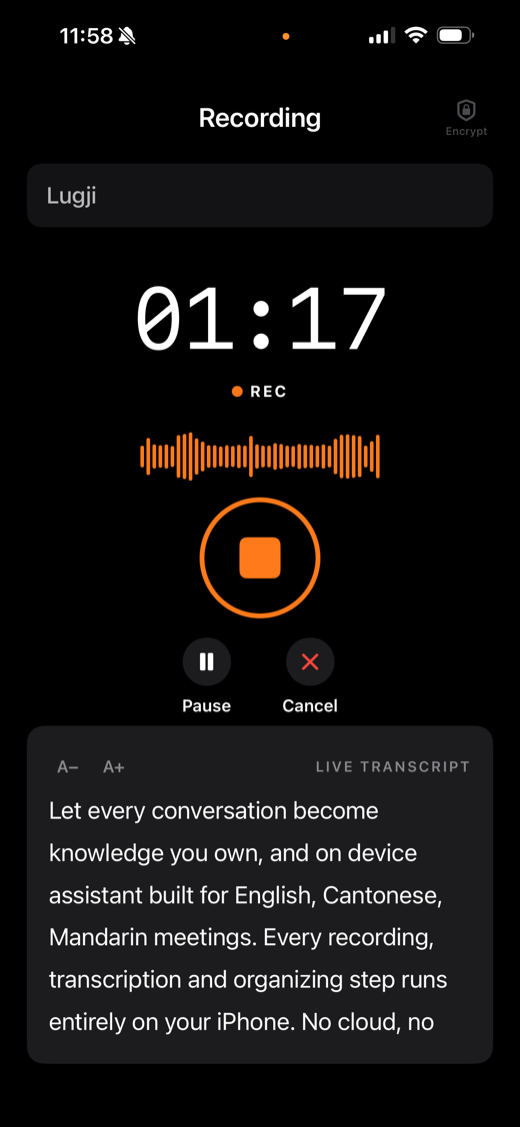
Long meetings and interviews, captured the moment you finish
Start recording with one tap for long meetings or interviews. Cantonese, Mandarin and English are transcribed live, then saved automatically — all on your iPhone.
- Stable recording for long meetings and interviews
- Live transcription in Cantonese, Mandarin and English
- Saved automatically to on-device, iCloud or Obsidian
- Apple's built-in engine, fully on-device
Write into Obsidian · your knowledge stays yours
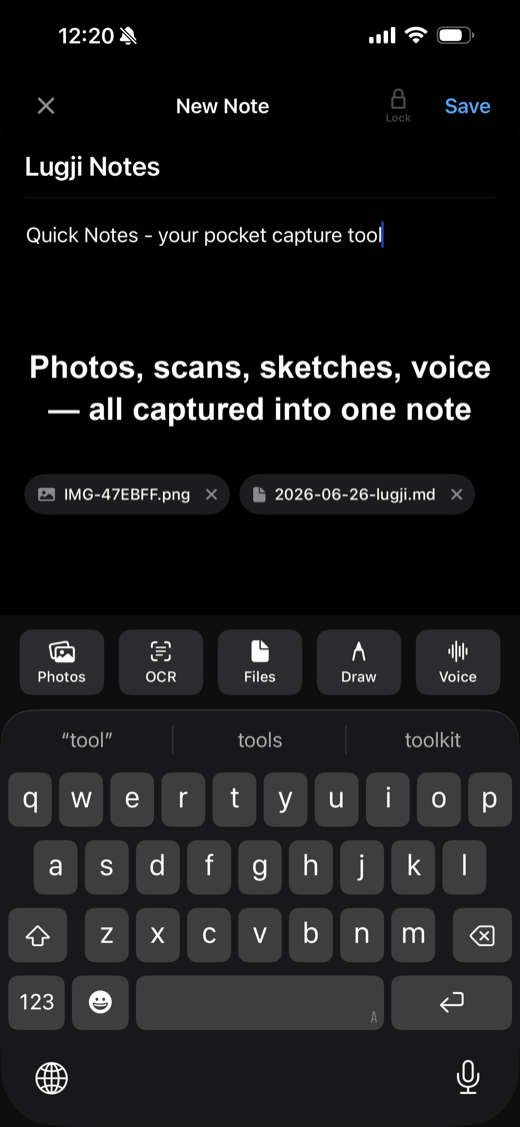
Every note is written as standard Markdown (.md) straight into your connected Obsidian vault, with frontmatter and tags. Not another closed notes app — Obsidian is your library; Lugji is just the fastest way in.
Sketches & drawing attachments
Draw, sketch or jot key points with Apple Pencil or your finger, then attach it to a note with one tap — stored alongside the text in the same .md.
Image text recognition (OCR)
Snap a whiteboard, business card or handwritten note, and Lugji recognises the text inside (Traditional Chinese + English) into the note body — a photo becomes searchable knowledge, not a static image.
Voice to text · the same commercial-grade Cantonese engine
Record a voice snippet inside a note and Lugji's core Apple engine transcribes it into the note on the spot — the same Cantonese recognition as meeting recording, not a second-rate model.
Fully on-device · no Lugji server
All of the above — transcription, recognition, organising — runs on your iPhone. No Lugji server, no account, nothing sent to a processing server. Privacy here isn't packaging; it's a structural fact.
Knowledge that connects, and gets smarter the more you use it
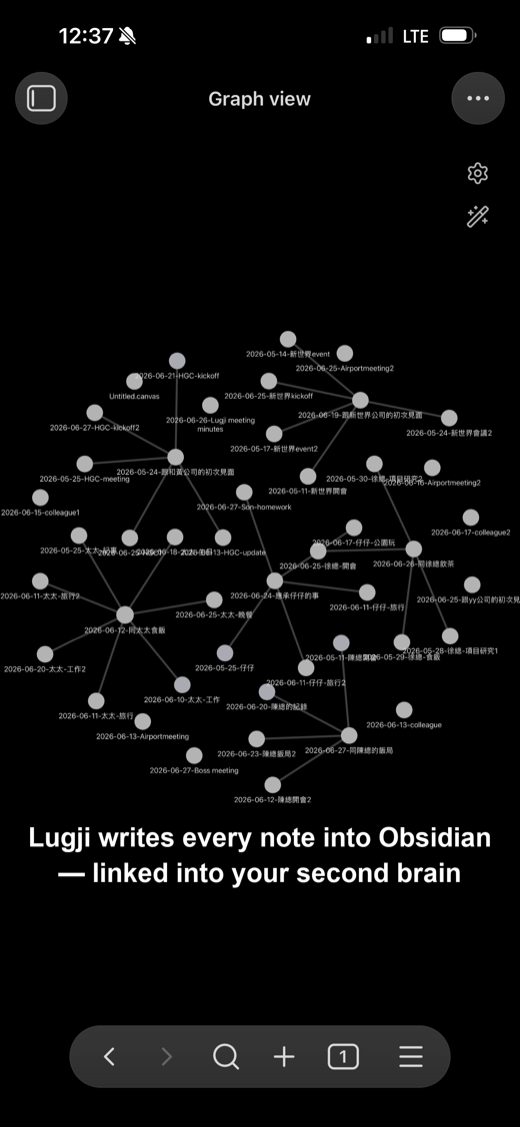
Every note is written into your Obsidian vault as a node in your knowledge graph. Over time, meetings, ideas and handwriting weave into a second brain that's entirely yours.
- A knowledge graph that makes the connections clear at a glance
- Full-text search to revisit any past conversation instantly
- Standard Markdown — your data belongs to you
From a spoken word to your knowledge base
From on-device capture in Lugji, to optional polishing in Lugoffice, into an enterprise RAGBox — each step makes clear what stays on your device and what goes to the cloud. You decide.
Speak
Meetings, interviews, ideas — start recording with one tap.
Transcribe live
Apple's built-in engine turns speech into text on-device, in real time.
Organise into notes
Date, tags and frontmatter are added automatically into structured Markdown — all on your device.
Need a document you can send? Hand it to Lugoffice — your choice of two paths
Lugoffice · Google Cloud AI
Processed by Google's cloud AI under enterprise terms — never used to train AI.
Lugoffice · Local AI
A local AI on your own RAGBox — data never leaves your premises, end to end.
Both paths converge into your own RAGBox
Into RAGBox
Your whole team's meeting memory flows into an enterprise RAGBox — data stays on your own box and never leaves your premises.
Why stop using cloud transcription?
Three tiers, all running on your device
Start free; Ultra enterprise plans available on request.
Free
For individuals getting started
US$0
No credit card required
- Transcription 20 / month
- Recording time Unlimited
- AI summaries Unlimited
- Notes 20 / month
Ultra
For individuals, teams and organizations that need advanced security and support
Custom pricing
Everything in Free, plus:
- Enterprise RAGBox private knowledge base (local AI · data stays on-prem)
- Encrypted audio at rest
- Face ID / locked notes
- Priority support
sales@lugji.app
AI summaries require Apple Intelligence™ (iPhone 15 Pro or later; not available in mainland China)
Sister app
Lugoffice — meetings that end in documents
Lugji captures every conversation privately, entirely on your iPhone. When you need something you can actually send, Lugoffice (a separate app) turns the text you choose into minutes, notices, emails and weekly reports.
- Written-style minutes — spoken transcripts become minutes or documents you can send
- Consolidate several meetings into a weekly report — pick a few meetings, combined into one day-by-day report
- Sends text only, never audio — only the meeting text you mark; the recording always stays on your device
To be clear: Lugoffice sends the text you choose to a cloud AI — the audio recording is never sent. Lugji itself stays 100% on-device with no server. Two apps, two roles — you decide what gets sent.
For enterprise
RAGBox — your private, on-prem knowledge base
Keep your whole team's meeting memory on your own box or server — data never leaves your premises. The same privacy-first design as Lugji and Lugoffice, built for regulated industries like finance and healthcare.
Contact us to learn moreFAQ
Anything else you'd like to know?
-
Does it support Cantonese?
Yes. It uses Apple's built-in on-device speech engine, running entirely on your iPhone. Cantonese is available now, with Mandarin and English rolling out.
-
Is it paid?
Lugji is free to start (with usage limits). Enterprise teams, organizations, or anyone needing advanced security can enquire about a tailored Ultra plan. Final pricing will be confirmed at launch.
-
Does it work on iPhone 11 or SE (2nd gen)?
You can install and record, but Apple's on-device transcription engine doesn't support A13-chip devices (iPhone 11 series, SE 2nd gen) — transcription needs iPhone 12 / SE (3rd gen) or newer; on iPad it needs iPad (10th gen) / iPad Air (4th gen) / iPad mini (6th gen) / iPad Pro (11-inch 3rd gen, 12.9-inch 5th gen) or newer. Recordings are saved to your iCloud, so opening the same meeting on a supported device transcribes it.
-
Does audio go to the cloud?
No. Recording and transcription run entirely on-device, and your audio stays on your phone. No servers, no API keys, no tracking.
-
How does it sync with Obsidian?
The iOS app uses iCloud Drive to write notes automatically into the 'Lugji Meetings' folder in your vault. Open Obsidian and they're already there — no plugin, no API key.
-
Do I have to use Obsidian?
No. Recording and transcription work on their own, and you can keep the Markdown yourself. But it's best paired with Obsidian — three months on, you'll still find the meeting you had today.
Ready to build your second brain, one conversation at a time?
Lugji is live on the App Store — download free to get started.
DownloadiPhone + iPad · requires iOS 26 or later · on-device transcription needs iPhone 12 / SE (3rd gen) / iPad (10th gen) / iPad Air (4th gen) / iPad mini (6th gen) or newer